How to Backup your MYOB file
How to create a MYOB File backup
- Firstly, open your MYOB file.
Click on the File menu, and go down to Back Up
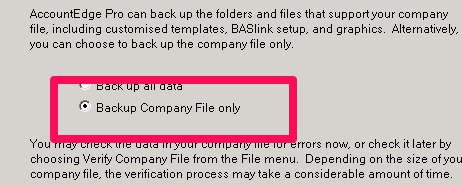
- If prompted please make sure that you Backup Company File only.

- From here, you will get a new Pop Up box prompting you to select where to save the file, and whether or not you wish to have a Password. We suggest saving it to your desktop, or somewhere you are able to find it easily. We also prefer the password section is left blank, as this can cause unnecessary delays in your conversion.
- Once you have done this, click on Back Up

- If you have saved your file to the desktop, you will see a Zip folder on your desktop.
Please do NOT attempt to manually change the extension on your file, as this will make it unable to be opened - We recommend that you remove the administrator password prior to
uploading the file to avoid any potential issues. (It is the
Administrator password, not another user).
NOTE: Please do not add a password to the zipped folder.
Your file is now ready to be uploaded via our website!
Related Articles
How to Backup your Reckon file
How to create a Reckon Desktop File backup To save the backup of your Reckon desktop file, please follow the following steps. Click on the File menu > Save Copy or Backup Select Backup Copy and click Next Select Local Backup and click Next Browse the ...
How to Backup your Quickbooks Desktop file
How to create a Quickbooks Desktop File backup To create your backup, follow the instructions in this link or the screenshots below: NOTE: Please do not take an Accountants backup as these cannot be used for conversion. 1. Open the company file that ...
Reckon Hosted
What Versions of Reckon do you convert? The Reckon conversion service is for Australia only. Please see here for what we can convert. What is Converted? Contacts Chart of Accounts Inventory Items Jobs / Categories Open invoices & bills Closed ...
Reckon Desktop
What Versions of Reckon do you convert? The Reckon conversion service is for Australia only. Please see here for what we can convert. What is Converted? Contacts Chart of Accounts Inventory Items Jobs / Categories Open invoices & bills Closed ...
What File Types Can and Cannot be Converted?
MYOB Files must be under 800Mb and either .MYO or .MYOX if they are over 800Mb you can use our custom conversions. They must not have Multi-Currency or Multi-locations. Version of MYOB Australia New Zealand Account Right Y Y Account Right Live Y Y ...